
Bester Projektor für Wohnheime: Kaufratgeber für Studenten

Ein Studentenwohnheim ist selten für Unterhaltungszwecke ausgelegt.
Das Bett steht zu nah am Schreibtisch. Die Wandfläche ist begrenzt. Die Beleuchtung ist nicht immer optimal. Möglicherweise gibt es einen Mitbewohner, Ruhezeiten, gemeinsam genutztes WLAN und kaum Platz für einen Minikühlschrank.
Genau deshalb ist ein Projektor für Studentenwohnheime Das kann so viel Sinn ergeben.
Statt einen Fernseher auf eine Kommode zu quetschen oder eine große Leinwand in einen kleinen Raum zu schleppen, verwandelt ein kompakter Beamer eine leere Wand in eine Kinoleinwand, einen Gaming-Bildschirm, eine Lernwand oder einen gemütlichen Treffpunkt für Wochenendausflüge. Bei Nichtgebrauch lässt er sich platzsparend in einer Schublade, einem Rucksack oder einer Aufbewahrungsbox verstauen.
Aber nicht jeder kleine Projektor eignet sich gut für ein Studentenwohnheim.
Die richtige Wahl hängt von der Raumgröße, dem Wandabstand, der Helligkeit, dem Ton, der Streaming-Konfiguration, dem Campus-WLAN und der Häufigkeit des geplanten Standortwechsels ab. Dieser Leitfaden bietet eine praktische Übersicht, damit Studierende und Eltern einen Beamer für ihr Studentenwohnheim auswählen können, der den Anforderungen des realen Studentenlebens gerecht wird.
Kurzantwort: Was zeichnet einen guten Beamer fürs Studentenwohnheim aus?
- Kompakt genug für Schreibtisch, Regal oder Rucksack
- Einfache Montage ohne Bohren oder Befestigung.
- Klar genug für Filme, Sport, Spiele und Lernsitzungen
- Hell genug für die Betrachtung bei Nacht oder in abgedunkelten Räumen
- Ruhig genug für Gemeinschaftsräume
- Einfache Verbindung mit Smartphone, Laptop, Konsole oder Streaming-App
- Flexibel genug für kleine Wände und kurze Betrachtungsabstände.
Der beste Beamer fürs Studentenwohnheim ist nicht immer der hellste oder teuerste. Es ist derjenige, der in ein kleines Zimmer passt, ohne im Alltag zu stören.
Warum ein Projektor im Studentenwohnheim besser sein kann als ein Fernseher
Ein Projektor bietet Schülern mehr Flexibilität, da er kein fest installiertes Entertainment-Center benötigt. Man kann an eine Wand projizieren, eine kleine Leinwand ausrollen, ihn für Filmabende nutzen und ihn anschließend wieder verstauen, wenn man Platz braucht.

Ein Projektor ist besonders nützlich für Studenten, die nicht möchten, dass ein großer Fernseher das ganze Semester über den Raum einnimmt.
Beginnen Sie mit der Raumgröße und der Wandfläche.
Bevor Sie sich für einen Projektor für Ihr Studentenwohnheim entscheiden, sollten Sie sich das Zimmer genauer ansehen.
Stellen Sie diese Fragen:
- Gibt es eine freie Wand?
- Wie weit darf der Projektor von der Wand entfernt stehen?
- Wird das Bild durch ein Bett, einen Schreibtisch, ein Regal oder die Sachen des Mitbewohners verdeckt?
- Kann der Projektor auf gleicher Höhe mit der Leinwandfläche positioniert werden?
- Werden Sie es zwischen Zimmern, Aufenthaltsräumen oder Wohnungen hin und her bewegen?
In Studentenwohnheimen ist der Platz oft begrenzt, daher spielt der Projektionsabstand eine wichtige Rolle. Ein Projektor, der viel Platz benötigt, um ein großes Bild zu erzeugen, funktioniert in einem kleinen Raum möglicherweise nicht gut.
Für die meisten Studentenwohnheime sollten Studierende eine Bildschirmgröße von etwa 50 bis 80 Zoll. Es ist groß genug, um Spaß zu machen, aber nicht so groß, dass Helligkeit und Platzierung zum Problem werden.
Helligkeit: Wie viele Lumen benötigt man in einem Studentenwohnheim?
Studentenwohnheime sind in der Regel einfacher zu nutzen als Außenbereiche, da man das Licht besser regulieren kann. Man kann das Deckenlicht ausschalten, die Jalousien herunterlassen und nachts beobachten.
Das bedeutet, dass ein Projektor im Studentenwohnheim nicht so hell sein muss wie ein Projektor für ein komplettes Wohnzimmer oder für den Außenbereich.
Für die Nutzung im Studentenwohnheim:

Der Schlüssel liegt darin, nach ... zu suchen ehrliche ANSI-Helligkeit, Keine vagen, übertriebenen Lumenangaben. Ein Projektor mit realistischen Helligkeitswerten hilft Schülern, vor dem Kauf die richtigen Erwartungen zu entwickeln.
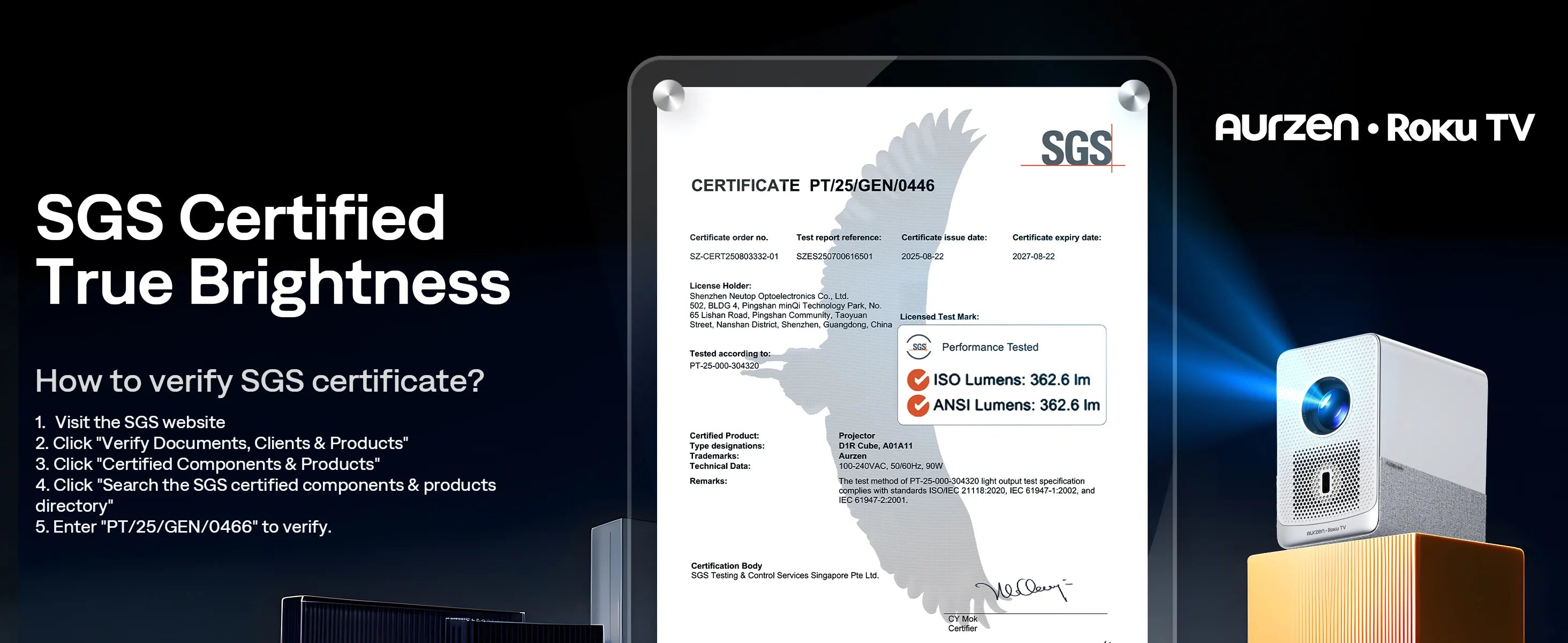
Falls das Bild dunkel erscheint, versuchen Sie zunächst drei einfache Lösungsansätze:
- Schalten Sie die Lichter in der Nähe aus
- Bildgröße verkleinern
- auf eine glattere, hellere Oberfläche projizieren
Ein kleineres, helleres Bild sieht in der Regel besser aus als ein riesiges, verwaschenes Bild.
Native 1080p ist für die meisten Studenten optimal.
Für einen Projektor im Studentenwohnheim, native 1080p ist in der Regel die beste Balance.
Es ist klar genug für:
- Streaming im Netflix-Stil
- YouTube
- Sport
- Gelegenheitsspiele
- Vorlesungsfolien
- Gruppenlernsitzungen
- Videoanrufe oder Präsentationen
Ein 4K-Projektor sieht zwar toll aus, ist aber oft teurer und für ein kleines Studentenwohnheimzimmer unter Umständen überflüssig. Die meisten Studierenden profitieren mehr von einfacher Einrichtung, guter Helligkeit, zuverlässigem Streaming und flexibler Aufstellung als von der Jagd nach der höchsten Auflösung.
Achten Sie darauf, dass der Projektor tatsächlich natives 1080p unterstützt, wenn Ihnen Schärfe wichtig ist. „Unterstützt 1080p“ bedeutet nicht automatisch, dass der Projektor in nativem 1080p aufzeichnet.
Der Ton ist wichtiger, als die Schüler erwarten.
Ein Beamer für das Studentenwohnheim benötigt einen Ton, der in einem kleinen Mehrbettzimmer funktioniert.
Die eingebauten Lautsprecher reichen für gelegentliches Ansehen oft aus, besonders wenn der Projektor in der Nähe des Bettes oder Schreibtisches steht. Für Filmabende mit Freunden ist ein Bluetooth-Lautsprecher jedoch deutlich praktischer, um die Dialoge besser zu verstehen.
Denken Sie darüber nach:
- Lautstärke des Lautsprechers
- Bluetooth-Audiounterstützung
- Lüftergeräusch
- Ruhezeiten
- Mitbewohnerkomfort
- ob Untertitel benötigt werden
In Mehrbettzimmern ist lauter nicht immer besser. Deutliche Gespräche bei moderater Lautstärke sind in der Regel sinnvoller, als den Raum durch den Flur zu beschallen.
Bei einer guten Einrichtung im Studentenwohnheim befindet sich der Ton in der Nähe der Zuschauer, nicht unbedingt neben dem Projektor.
Streaming im Studentenwohnheim: Überprüfen Sie zuerst die WLAN-Situation.
Das WLAN auf dem Campus kann problematisch sein.
Manche Wohnheimnetzwerke verwenden Anmeldeseiten, Geräteregistrierung oder Sicherheitseinstellungen, die Streaming-Geräte, Casting oder Smart-Projektoren beeinträchtigen können. Studierende sollten sich daher vor dem Kauf überlegen, wie sie die Inhalte konsumieren möchten.
Gängige Streaming-Optionen für Studentenwohnheime sind:
- integrierte Smart-TV-Apps
- HDMI-Anschluss von einem Laptop
- Streaming-Apps für Spielekonsolen
- Bildschirmspiegelung des Telefons
- Streaming-Stick oder Dongle
- Inhalte von einem Laptop oder Tablet heruntergeladen
Die sicherste Konfiguration bietet in der Regel mehrere Anschlussmöglichkeiten. HDMI ist nach wie vor nützlich, da es funktioniert, wenn WLAN oder Streaming unzuverlässig sind.
Für Studierende ist der beste Projektor nicht nur der mit Apps. Er bietet auch Alternativen, wenn das WLAN auf dem Campus mal wieder nervt.
Aufstellungsort für den Projektor: Schreibtisch, Regal, Nachttisch oder Stativ?
Ein Beamer für ein Studentenwohnheim sollte sich leicht aufstellen lassen, ohne dass der Raum unordentlich wirkt.
Gängige Platzierungsmöglichkeiten:
- Schreibtisch
- Nachttisch
- Regal
- Aufbewahrungswürfel
- Stativ
- kleiner Rollwagen
Ein Stativ oder ein verstellbarer Ständer kann hilfreich sein, wenn der Projektor höher oder tiefer ausgerichtet werden muss. Verfügt der Projektor über Autofokus oder Trapezkorrektur, wird die Einrichtung einfacher, die Positionierung ist aber dennoch wichtig.
Beachten Sie diese Regel:
Positionieren Sie den Projektor zunächst so gerade wie möglich und verwenden Sie die Trapezkorrektur erst dann zur Feinabstimmung des Bildes.
Eine zu starke Trapezkorrektur kann die Bildschärfe beeinträchtigen, insbesondere bei Texten, Untertiteln oder Spielen.
Wand oder Leinwand: Brauchen Schüler eine Projektionsleinwand?
Nicht immer.
Eine glatte, helle Wand eignet sich gut für ein Studentenwohnheim. Viele Studenten beginnen sogar mit einer Wand und rüsten später auf, wenn sie den Projektor häufig nutzen.
Verwenden Sie eine Wand, wenn:
- Die Wand ist weiß oder hellgrau
- Die Oberfläche ist glatt
- du schaust hauptsächlich gelegentlich
- Sie möchten die einfachste Konfiguration
Erwägen Sie einen Sichtschutz, wenn:
- Die Wand ist strukturiert.
- Die Wandfarbe verändert das Bild
- Sie möchten einen besseren Kontrast
- du schaust oft
- Sie benötigen ein schärferes Bild für Filme oder Spiele.
Ein kleiner Falt- oder Rollschirm kann das Bild verbessern, ist aber nicht für jedes Studentenwohnheimzimmer erforderlich.
Gaming auf einem Beamer im Studentenwohnheim
Ein Beamer kann eine unterhaltsame Spielumgebung im Studentenwohnheim sein, insbesondere für Gelegenheitsspiele.
Es eignet sich gut für:
- Nintendo Switch
- Partyspiele
- Sportspiele
- Koop-Spiele
- Gelegenheitsspiele auf Konsolen
- Spieleabende in der Gruppe
Beim kompetitiven Gaming sollten Schüler mehr Wert auf Eingabeverzögerung, Bildwiederholfrequenz und HDMI-Leistung legen.
Wenn Gaming Priorität hat, achten Sie auf Folgendes:
- HDMI-Eingang
- stabile Verbindung
- Spielmodus, falls verfügbar
- klare Bewegung
- moderate Bildschirmgröße
- geringe Audioverzögerung
Ein riesiges projiziertes Bild kann das Spielerlebnis geselliger gestalten. Achten Sie nur darauf, dass die Leinwandgröße angemessen ist, damit das Bild hell und scharf bleibt.
Checkliste für den Kauf eines Beamers fürs Studentenwohnheim
Bevor Sie einen Projektor für das Studium kaufen, sollten Sie folgende Punkte beachten:
- Passt es auf einen Schreibtisch, ein Regal oder einen kleinen Ständer?
- Ist das Bild in einem Abstand von 50 bis 80 Zoll scharf?
- Ist die Helligkeit ehrlich und realistisch?
- Unterstützt es die von Ihnen am häufigsten verwendete Streaming-Methode?
- Kann es per HDMI an einen Laptop oder eine Konsole angeschlossen werden?
- Ist der Klang gut genug, oder kann es eine Bluetooth-Audioverbindung herstellen?
- Ist die Einrichtung einfach genug, um sie häufig wiederholen zu können?
- Ist das Packen beim Auszug einfach?
- Funktioniert es mit Ihrem Campus-WLAN oder einer alternativen WLAN-Quelle?
Wenn die Antwort auf die meisten dieser Fragen Ja lautet, ist der Projektor wahrscheinlich für Studentenwohnheime geeignet.
Wo Aurzen Passend für: ZIP vs EAZZE D1R-Würfel
Verschiedene Studierende nutzen Projektoren auf unterschiedliche Weise. Manche bevorzugen ein möglichst kleines Gerät für unterwegs und flexible Einsatzmöglichkeiten. Andere wünschen sich ein Gerät, das einem Fernseher ähnelt, mit integrierten Streaming-Apps und einem vertrauten Startbildschirm.
Dort
Aurzen ZIP Ideal für ultraportable Studentenwohnheim-Setups
Der
- Schüler mit begrenztem Platz am Schreibtisch
- Studentenwohnheime mit flexiblen Wandwinkeln
- Filmabende in verschiedenen Räumen
- Reisen zwischen Wohnort und Campus
- schnelle Pop-up-Ansicht
- Studenten, die einen Mini-Projektor wünschen, der leicht zu verstauen ist
Durch sein dreiteiliges Design unterscheidet es sich von herkömmlichen Mini-Projektoren im Kastenformat. Anstatt in jeder Situation einen sperrigen Ständer zu benötigen,
Wählen

Am besten
Nutzen Sie es in einem abgedunkelten Raum, wählen Sie eine moderate Bildschirmgröße und die Verbindungsmethode, die für Ihre Inhaltsquelle am besten geeignet ist. Bei geschützten Streaming-Apps benötigen Schüler möglicherweise einen kompatiblen Dongle, anstatt sich ausschließlich auf die drahtlose Bildschirmspiegelung zu verlassen.
Aurzen EAZZE D1R Cube Roku TV Smart-Projektor: Ideal für Streaming im Studentenwohnheim – wie im Fernsehen.
Der
Sein größter Vorteil ist die integrierte Roku TV. Dadurch ist die Benutzeroberfläche vertraut für Studenten, die bereits zu Hause Roku nutzen oder einfachen Zugriff auf beliebte Streaming-Apps wünschen, ohne ein kompliziertes Setup aufbauen zu müssen.
Der D1R Cube eignet sich am besten für:
- Schlafsäle
- Schlafzimmer
- kleine Wohnungen
- Studenten, die integriertes Streaming wünschen
- Nutzer, die Roku TV bevorzugen
- ungezwungene Filmabende
- Studenten, die keine zusätzlichen Streaming-Sticks wünschen
Er eignet sich auch gut für Studenten, die einen Projektor wünschen, der sich eher wie ein kleiner Smart-TV anfühlt, aber mit einer größeren und flexibleren Leinwand.
Für die Aktivierung sind ein Roku-Konto und eine Internetverbindung erforderlich. Studierende sollten daher vor der Einrichtung die WLAN-Regeln des Campus prüfen. Falls im Wohnheimnetzwerk Gerätebeschränkungen gelten, kann die Verbindung über HDMI mit einem Laptop oder einer anderen zugelassenen Quelle als sinnvolle Alternative dienen.
Wählen

Aurzen ZIP vs EAZZE D1R Cube für Studentenwohnheime

Die besten Ideen für die Beamer-Einrichtung im Studentenwohnheim
1. Film-Setup am Bett
Stellen Sie den Projektor auf einen Nachttisch oder ein kleines Regal und projizieren Sie das Bild auf eine freie Wand in der Nähe des Bettes. Für ein helleres und schärferes Bild sollte der Projektor etwa 50 bis 70 Zoll (ca. 127 bis 178 cm) voneinander entfernt sein.
2. Tisch-Wand-Konfiguration
Nutzen Sie den Schreibtisch als Projektorständer und projizieren Sie quer durch den Raum. Das ist ideal für Schüler, die einen stabilen Aufbau ohne zusätzliche Möbel wünschen.
3. Lounge-Abend-Setup
Bring einen tragbaren Beamer in den Aufenthaltsraum deines Studentenwohnheims und nutze eine leere Wand oder eine tragbare Leinwand. Für gemeinsames Ansehen kannst du einen Bluetooth-Lautsprecher hinzufügen.
4. Gaming-Setup
Schließen Sie eine Konsole oder einen Laptop mit HDMI an, wählen Sie eine moderate Bildgröße und vermeiden Sie eine starke Trapezkorrektur für ein schärferes Spielerlebnis.
5. Studienaufbau
Nutzen Sie den Projektor für Präsentationen, Gruppenübungen, Sprachkurse oder Videovorträge. Eine freie Wand und eine angemessene Bildschirmgröße sorgen dafür, dass der Text gut lesbar bleibt.
Häufige Fehler bei der Verwendung von Projektoren im Studentenwohnheim, die Sie vermeiden sollten
Kauf ausschließlich nach Lumenangaben
Eine hohe Lumenangabe ist nutzlos, wenn sie nicht korrekt gemessen wurde. Achten Sie auf realistische Helligkeitsangaben.
Wurfdistanz ignorieren
Ein Projektor, der nicht in Ihren Raum passt, wird frustrierend sein, egal wie gut er online aussieht.
Vorausgesetzt, das WLAN auf dem Campus funktioniert einwandfrei
Halten Sie immer eine alternative Verbindungsmethode bereit, z. B. eine HDMI-Verbindung von einem Laptop.
Verwendung eines zu großen Bildes
Ein riesiges Bild mag zwar cool aussehen, aber in einem kleinen Studentenwohnheim kann es blass oder unscharf wirken.
Den Klang vergessen
Eingebaute Lautsprecher mögen für das Alleinschauen ausreichen, aber für Filmabende in der Gruppe benötigt man oft Bluetooth-Audio.
Überbeanspruchung der Trapezkorrektur
Stellen Sie den Projektor zunächst gerade auf. Verwenden Sie die Trapezkorrektur nur bei Bedarf.
Fazit
Der beste Projektor für Studentenwohnheime ist nicht der größte, hellste oder teuerste. Es ist derjenige, der am besten zu den tatsächlichen Bedürfnissen der Studenten passt.
Ein guter Beamer fürs Studentenwohnheim sollte kompakt sein, ein klares Bild liefern, einfach einzurichten sein, Streaming-Funktionen bieten und sich leicht verstauen lassen. Er sollte für Filme, Spiele, Lernsitzungen und entspannte Treffen geeignet sein, ohne dabei zu viel Platz einzunehmen.
Für Studenten, die eine möglichst mobile Lösung wünschen,
In einem kleinen Studentenzimmer zählt die Praktikabilität. Der Projektor, den Sie häufig benutzen, ist besser als der mit den höchsten technischen Daten auf der Verpackung.
Häufig gestellte Fragen
1. Welcher Projektor eignet sich am besten für Studentenwohnheime?
Der beste Projektor für Studentenwohnheime ist kompakt, einfach einzurichten, hell genug für dunkle Räume und flexibel mit Streaming- oder HDMI-Anschlüssen. Für maximale Mobilität,
2. Ist ein Projektor besser als ein Fernseher für ein Studentenwohnheim?
Ein Beamer kann im Studentenwohnheim praktischer sein als ein Fernseher, da er Platz spart, ein größeres Bild erzeugt und bei Nichtgebrauch verstaut werden kann. Ein Fernseher eignet sich besser für helles Tageslicht und bietet den Komfort, immer eingeschaltet zu sein.
3. Wie viele Lumen benötige ich für einen Beamer in meinem Studentenwohnheim?
In Studentenwohnheimen ist extreme Helligkeit in der Regel nicht nötig, da Studierende oft abends oder bei schwachem Licht fernsehen. Achten Sie auf die korrekte ANSI-Helligkeit und wählen Sie eine realistische Bildschirmgröße für optimale Ergebnisse.
4. Kann ich einen Projektor an einer Wand im Studentenwohnheim verwenden?
Ja. Eine glatte, helle Wand eignet sich gut für einen Beamer im Studentenwohnheim. Eine Leinwand kann Kontrast und Bildschärfe verbessern, ist aber für gelegentliches Fernsehen nicht unbedingt erforderlich.
5. Kann ein Projektor eine Verbindung zum Campus-WLAN herstellen?
Das hängt vom jeweiligen Campusnetzwerk ab. Manche WLAN-Systeme in Studentenwohnheimen erfordern eine Geräteregistrierung oder Anmeldeseiten. Studierende sollten die Netzwerkregeln der Hochschule überprüfen und vorsichtshalber ein HDMI-Kabel von einem Laptop bereithalten.
6. Ist Aurzen ZIP Gut für Studenten?
Ja.
7. Ist Aurzen EAZZE Ist der D1R Cube für Streaming im Studentenwohnheim geeignet?
Ja.
8. Welche Bildschirmgröße eignet sich am besten für einen Beamer im Studentenwohnheim?
Für die meisten Studentenwohnheime ist ein Bereich von 50 bis 80 Zoll praktikabel.Es fühlt sich viel größer an als ein Laptop oder ein kleiner Fernseher, während Helligkeit und Schärfe leichter zu steuern sind.
Mehr lesen
- Tragbarer Projektor oder Fernseher: Was ist besser für die Sommerunterhaltung?
- Wie viele ANSI-Lumen benötigt man für Open-Air-Kino?
- Die besten tragbaren Projektoren 2026: Für Zuhause, draußen, Schlafzimmer & Reiseführer
- Beamer oder Fernseher zum Fußballgucken: Was ist besser?
- Wie man schnelle Sportarten ohne Bewegungsunschärfe auf einem Projektor anschaut


